Instant e-PAN is the fastest way to get a Permanent Account Number in India. There is no form to print, no document to upload and no fee: the income tax e-filing portal reads your details from Aadhaar e-KYC and DigiLocker, and issues a digitally signed PAN as a PDF, usually within minutes. This guide walks through the process exactly as it appears on incometax.gov.in today, with screenshots of each screen. Position as on 22 October 2026.
Short answer
Short answer: go to incometax.gov.in, click Instant E-PAN under Quick Links, choose Get New e-PAN, accept the consent declaration, enter your Aadhaar number and the OTP sent to your Aadhaar-linked mobile, confirm your details and DigiLocker date-of-birth document, and submit. You get an acknowledgement number at once, and the e-PAN PDF can be downloaded from the same page under Check Status / Download e-PAN. It is free of cost.
Who can apply for instant e-PAN
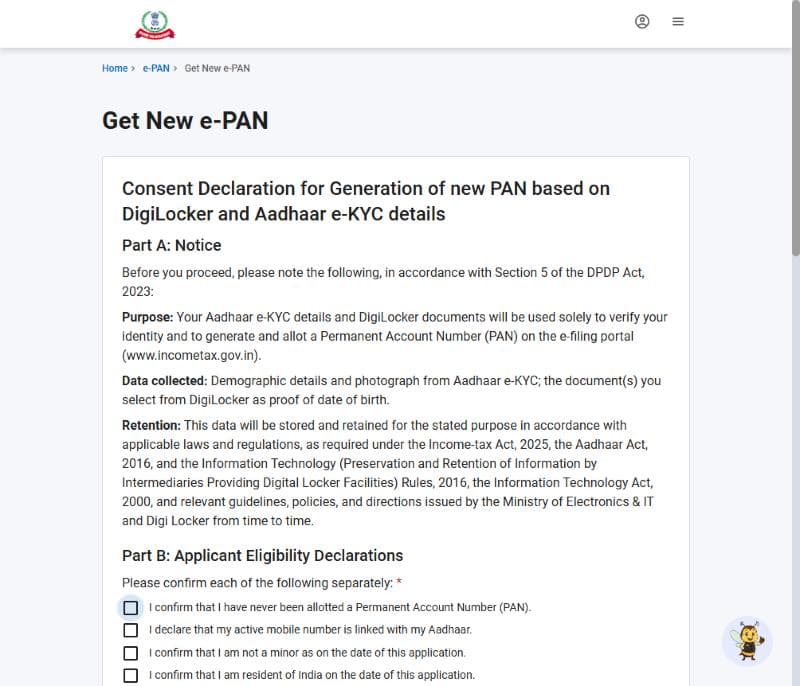
The portal asks you to confirm four declarations before it lets you proceed. If any one of them is not true for you, use the regular PAN application (Form 49A) through Protean (NSDL) or UTIITSL instead.
- You have never been allotted a PAN before.
- Your active mobile number is linked with your Aadhaar.
- You are not a minor on the date of application.
- You are resident in India on the date of application.
What you need before you start
- Your 12-digit Aadhaar number.
- The mobile phone linked to that Aadhaar, to receive the OTP.
- A DigiLocker account (you can create one during the process with the same Aadhaar), used to pick up a date-of-birth document.
- Correct name, date of birth and gender in Aadhaar. e-PAN copies these as they are, so fix any error in Aadhaar first.
How to apply for instant e-PAN: step by step with screenshots
Open the income tax portal and click Instant E-PAN
Go to www.incometax.gov.in. You do not need to log in or register. Scroll down to the Quick Links section on the home page and click Instant E-PAN.

Choose Get New e-PAN
The e-PAN page explains the facility and shows two options. To apply, click Get New e-PAN. The other option, Check Status / Download e-PAN, is what you use after applying.
- The page confirms that e-PAN is issued in PDF format and is free of cost.
- Note the warning about holding more than one PAN.

Read and accept the consent declaration
The portal shows a consent declaration for generating a new PAN from DigiLocker and Aadhaar e-KYC details. Read each part, tick each declaration that applies to you, tick 'I have read the consent terms and agree to proceed further' at the bottom, and click Continue.
- Part B: the four eligibility confirmations listed above.
- Parts C to E: consent to Aadhaar e-KYC, DigiLocker access and processing of the data by the Income Tax Department.
- Part F: you remain responsible for keeping your Aadhaar and DigiLocker details accurate.
Enter your Aadhaar number and verify the OTP
Enter your 12-digit Aadhaar number and continue. An OTP is sent to the mobile number linked with your Aadhaar. Enter it on the portal to complete Aadhaar e-KYC authentication.
Connect DigiLocker and validate your details
Sign in to DigiLocker when the portal asks, and select the document to be used as proof of date of birth. The portal then shows the name, date of birth, gender, photo and address taken from Aadhaar. Check them carefully, add your email address if asked, and confirm.
Submit and note the acknowledgement number
Submit the request. A success message with an acknowledgement number appears on screen and is also sent to your mobile. Write it down or take a screenshot: you need it if you contact the helpdesk. In most cases the PAN is allotted within minutes.
How to check status and download your e-PAN
- Go back to incometax.gov.in, click Instant E-PAN under Quick Links.
- Under Check Status / Download e-PAN, click Continue.
- Enter your Aadhaar number and the OTP sent to your linked mobile.
- The status of your request is shown. Once the PAN is allotted, click Download e-PAN to save the PDF. If you gave an email address, a copy is also sent there.
e-PAN vs physical PAN card
| Instant e-PAN | Regular PAN (Form 49A) | |
|---|---|---|
| Where to apply | incometax.gov.in | Protean (NSDL) or UTIITSL |
| Documents | None to upload — Aadhaar e-KYC and DigiLocker | Proof of identity, address and date of birth, photo |
| Fee | Free | A fee is charged, higher for a card sent abroad |
| Time | Usually minutes | Several days, plus delivery time for the card |
| What you get | Digitally signed PDF with a QR code | e-PAN plus a physical card by post |
| Validity | Same as a physical PAN card | Same |
An e-PAN is a valid PAN card in every sense — banks, employers and brokers accept the PDF. If you still want a plastic card, you can order a reprint of your existing PAN through Protean or UTIITSL for a small fee. Do not file a fresh PAN application for that.
Common problems and how to fix them
- OTP not received: your mobile number is probably not linked with Aadhaar, or the link is old. Update it at an Aadhaar Seva Kendra, then apply.
- Wrong name or date of birth in Aadhaar: correct Aadhaar first through the UIDAI process. e-PAN will copy whatever Aadhaar shows.
- Applicant is a minor, an NRI or a company: instant e-PAN is not available. Use Form 49A or 49AA through Protean or UTIITSL.
- You already have a PAN: do not apply again. Use Check Status / Download e-PAN, or the Protean / UTIITSL e-PAN download, to get a copy.
- Request pending beyond 24 hours or rejected: apply through Protean or UTIITSL, as the portal advises.
Frequently Asked Questions
Is instant e-PAN free?
Yes. The income tax department issues instant e-PAN free of cost, as a PDF, through the e-filing portal at incometax.gov.in.
How long does instant e-PAN take?
Usually a few minutes after you submit the request. If it is not serviced within 24 hours, or is rejected, the portal advises applying through Protean (NSDL) or UTIITSL.
What documents are needed for instant e-PAN?
No documents are uploaded. You need a valid Aadhaar number, the mobile number linked with that Aadhaar to receive the OTP, and a DigiLocker account for the date-of-birth document.
Is e-PAN valid like a physical PAN card?
Yes. The e-PAN is a digitally signed PAN card in electronic form and holds the same value as a physical PAN card.
Can an NRI or a minor apply for instant e-PAN?
No. The applicant must confirm that they are resident in India and not a minor on the date of application. NRIs and minors apply through Form 49A or 49AA with Protean or UTIITSL.
How do I download my e-PAN after applying?
On incometax.gov.in, open Instant E-PAN from Quick Links, choose Check Status / Download e-PAN, enter your Aadhaar and OTP, and download the PDF once the PAN is allotted.
What happens if I hold two PAN numbers?
Holding more than one PAN is not allowed under Section 262 of the Income-tax Act, 2025, and Section 467 provides a penalty of ₹10,000. Surrender the extra PAN through Protean or UTIITSL.
Got your PAN? File your income tax return with a CA
PAN–Aadhaar linking, ITR filing and tax planning for salaried people, professionals and businesses in Ahmedabad — fee confirmed before we start.
Learn more